Go to Grades > Scores, click on the assignment column header. From the drop-down menu, select Flag Low Scores.
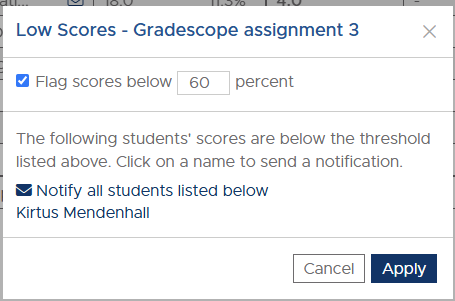
From the dialog box that then appears, choose the percentage below which scores are flagged. It will show a list of students that would be affected by the current percentage entered.
Note: Scores will be flagged based on a percentage only. If you want to flag according to points you will need to calculate the percentage.
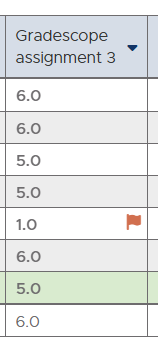
The flagged scores will be indicated by a red flag on the right side of the cell with the student's score.
Note: The Scores page will not automatically flag "low" scores. The instructor needs to configure what a "low" score is before that will work.
If the Display Option is set to display low scores, and the assignment is set to flag low scores, the number of students with low scores will be shown below. If the assignment is not set to flag low scores, even though the low scores display option is selected, no students will be shown as having low scores.
The flagged scores will be indicated by a red flag on the right side of the cell with the student's score.
Note: The Scores page will not automatically flag "low" scores. The instructor needs to configure what a "low" score is before that will work.
If the Display Option is set to display low scores, and the assignment is set to flag low scores, the number of students with low scores will be shown below. If the assignment is not set to flag low scores, even though the low scores display option is selected, no students will be shown as having low scores.